![logo.png]](https://kb.prologicfirst.online/hs-fs/hubfs/Imported%20sitepage%20images/logo.png?height=40&name=logo.png)
-
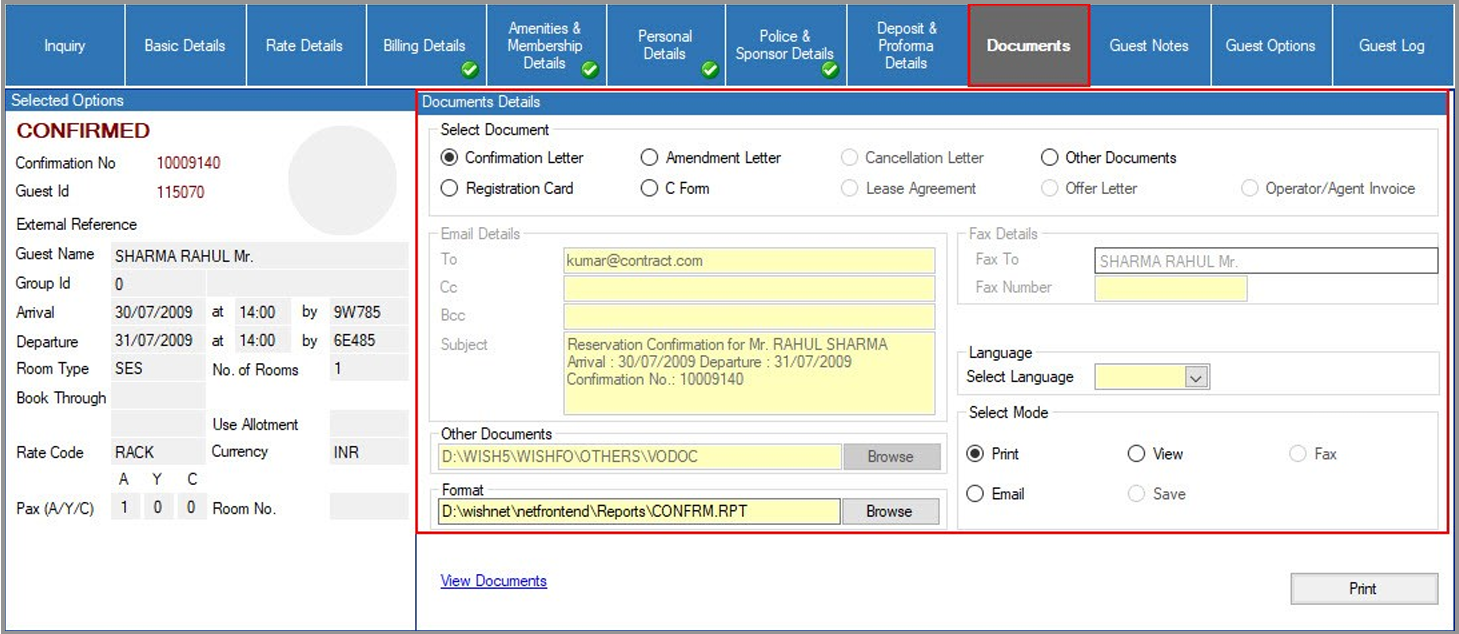
Offer Letter: This document is active and available for Direct Individual Reservations and can only be generated if the reservation is in an ‘offer’ status.
-
Operator/Agent Invoice: For Indirect Reservations, an invoice will be displayed instead of an Offer Letter. This invoice can be generated only if the reservation is confirmed.
-
Confirmation Letter: A confirmation letter can be generated when the reservation status is confirmed.
-
Amendment Letter: This letter can be generated when a reservation is modified and can be sent only if the reservation status is confirmed.
-
Cancellation Letter: This letter serves as confirmation of cancellation and can be sent if the reservation status is cancelled.
-
Other Documents: This feature allows you to send additional documents to the guest or reservation contact. Any Microsoft Word document saved on the local hard drive can be attached. Users can browse for a file to attach and choose the mode of dispatch (printed, faxed, or emailed). The addressee will be automatically filled in based on the reservation information (from the Confirm To field) but can be edited.
-
Registration Card: This option generates a Registration Card.
-
C-Form: The C-Form can be printed from this option.
Note: All documents, except the Registration Card and C-Form, can be viewed, printed, faxed, or emailed. The Registration Card and C-Form can only be viewed or printed.