![logo.png]](https://kb.prologicfirst.online/hs-fs/hubfs/Imported%20sitepage%20images/logo.png?height=40&name=logo.png)
The Touche POS Menu setup follows the below structure
Revenue Centre->Menu Head->Sub Menu->Items
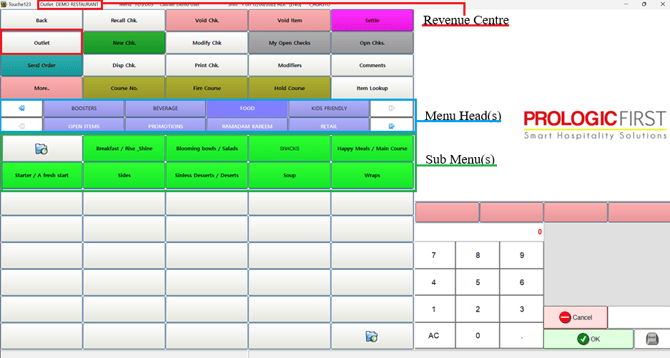
For each level, when creating a new one, Creation and Linking steps are both to be covered
For Creation:
- Outlet(s) are managed under Outlet Master
- Menu Head(s) are managed under Menu Head
- Sub Menu(s) are managed under Item Menu Link
- All Item Types are managed under Items Master, this includes the below item types:
- Menu Item: This option sets the key to function like a normal item with price, and is used by default
- Open Item: This option sets the key to function like an item where the price and name can be entered manually
- Fixed Package: This option sets the key to be linked with Menu Item keys, which helps to split the revenue ( Applicable in case of Combos and Promotions)
- Carte: This option sets the key to be linked with Menu Item keys with the option to split the items in a course wise selection mode, set with limitations and pricing.
- Modifier: This addon key is linked to menu item when its not to be printed on BILL and is of zero price. Depletion goes under a separate key, but does not transfer to BackOffice (WebProlific)
- Condiment: This addon key is linked to menu item when its to be printed on BILL and is of extra price. Depletion goes under a separate key and Back Office item transfer takes place as well (WebProlific).
- Option: This addon key is linked to menu item when its priced is to be added onto the menu item price, Depletion goes under the same key as the menu item and the name of the option is suffixed with the Menu Item Name.
For Linking:
Menu:
Outlet(s) and Menu Head(s) are linked under Outlet-Menu Head Link
Menu Head(s) and Sub Menu(s) are linked under Menu Head-Menu Link
Item(s) and Sub Menu(s) are linked under Item Menu Link
Items:
Menu Item(s) and Addons are linked under Item Addon Link
Carte and Menu Items are linked under Carte Setup
Fixed Package and Menu Items are linked under Package Items
Below can be referred for more details steps of each:
Items: https://kb.prologicfirst.online/articles/pos-menu-item-add
Sub Menu: https://kb.prologicfirst.online/articles/create/pos-menu-create
Menu-Heads: https://kb.prologicfirst.online/articles/create/pos-menuhead-create
Revenue Centre: https://kb.prologicfirst.online/articles/pos-outlets