![logo.png]](https://kb.prologicfirst.online/hs-fs/hubfs/Imported%20sitepage%20images/logo.png?height=40&name=logo.png)
Touche POS support below printing formats for each case:
BILL Printing:
Recommended configuration prerequisites:
- BILL Printers are connected to the POS machine via USB
- Thermal Printing Format
- Drivers are configured as per it's correct format
- Paper format: 3 1/8" x 230'
- Printer named as BILL and set as default in Devices and Printers
- Recommended model: EPSON TM-T20III via USB
Working:
Based on full settlement of BILLs or manual prints issued, BILL copies will be printed.
Basic format of Days Summary, Item Sales Report and Shift End Report can be printed as well.
Controls:
- Print count change:
Depending on whether the BILL was printed manually on selecting Print Check in the POS or printed on settlement, the columns Check Count and Print Count(S) respectively in Outlet Master can be set to print multiple copies. (Default value of 0 prints 1 only)
- Print format and size change:
BILL Printing in Touche is based on .rpt format files found in Frontend->reports32, named as per below format, with the ascending order determining the overriding:
check.rpt (default and picked up as general)
check<outlet_code>.rpt (based on outlet, using outlet code found in Outlet Master)
<property_id>_check.rpt (based on property ID)
<property_id>_check<outlet_code>.rpt (based on property ID and outlet code)

Editing the .rpts can be done with Crystal Reports 9
KOT Printing:
Recommended configuration prerequisites:
- KOT Printers are configured in the network via static IP
- Dot-Matrix Printing Format
- Drivers are configured as Generic/Text Only
- Paper format: 3" x 165'
- Recommended model: EPSON TM-U220B via Ethernet
- Printer named as per name configured in Kitchen Master under Printer and Port

Working:
Based on the linked printer in Item-Menu Link, KOT slips will be issued
Controls:
- Printing Trigger point:
Works for printing KOT slips by below means:
1. Printing directly via POS machine's printer queue: This is if printers are created in the POS machines and the control REMKOT is set as N
2. Printing via KOTPrinting application from a machine: A dedicated KOTPrinting application can be used to send KOTs from a single machine. All KOTs of orders from Android Touche are send via this application. To send KOTs of order from POS machines via the application, set the control REMKOT as Y.
- Printing Size Changes:
Sizing can be changed via INI.OUI in folder Frontend->system or WISH.CFG in KOTPrinting->Config depending on whether the control KOTRMT is set as N or Y respectively.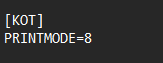
The value of file PRINTMODE determines the size as below:
PRINTMODE=8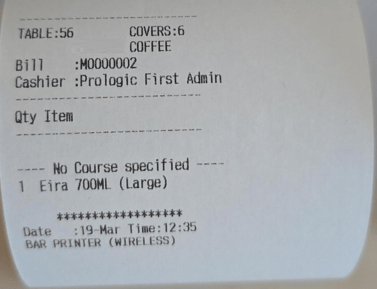
PRINTMODE=16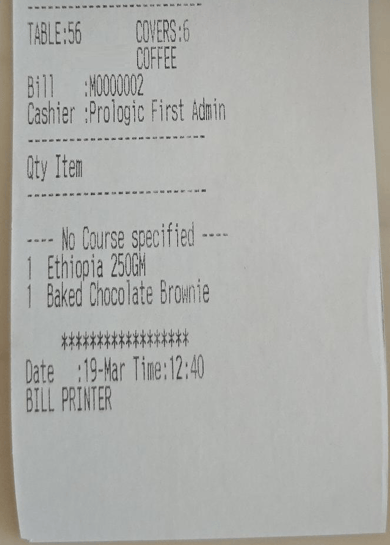
PRINTMODE=24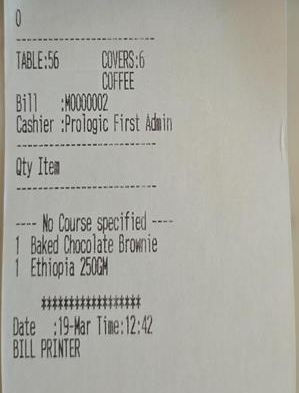
PRINTMODE=32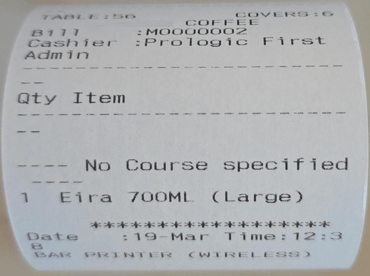
- Printing Data Changes:
The format of the data printed can be changed based on 2 files KH.CHK (Header) and HF.CHK (Footer) found in cli folder located in Frontend or KOTPrinting depending on whether the control KOTRMT is set as N or Y respectively. Fiels are set using available identifiers. Item data cannot be edited.
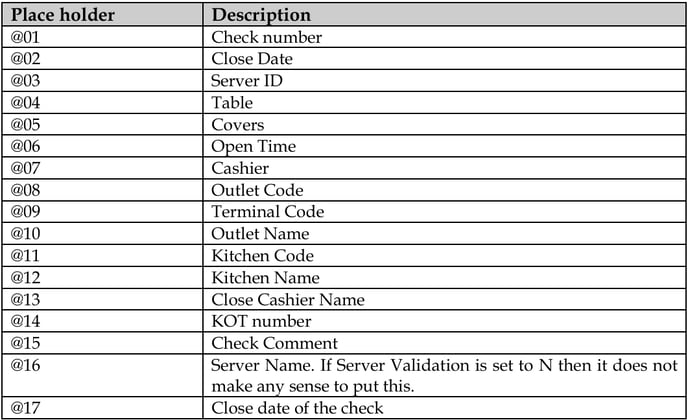
@40 - Order Type
- Printing Data Changes: