![logo.png]](https://kb.prologicfirst.online/hs-fs/hubfs/Imported%20sitepage%20images/logo.png?height=40&name=logo.png)
This is used in the case of splitting price between account codes under a single menu key. We will take the example to split 1 Promotion Package key into 2, each for food and beverage.
Prerequisites:
-
WebTouche Link
-
Administrative Configurations Login
- Configurations Access to Items Master, Item Group, Package Items and Item-Menu Link
-
Item Details, including the combo name and the items in it.
-
Menu Details
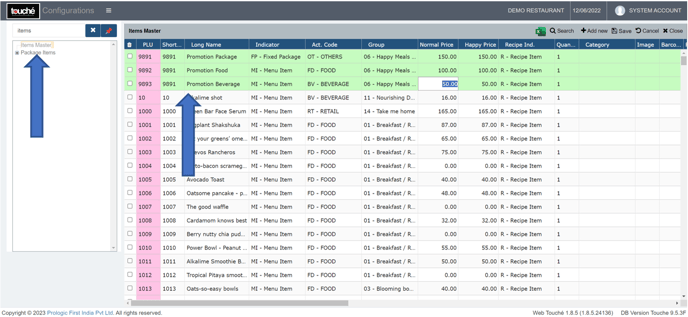
1. In Items Master, create 3 keys, 1 Fixed Package which will act as the master key and 2 Menu Item. Enter the prices here. Link the Fixed Package key only in Item-Menu Link to be punched in POS (Follow steps from the link: https://kb.prologicfirst.online/articles/pos-menu-item-add).
2. Refresh and go to Package Items, click the + sign, tick the box next to the package item you want to create, link the 2 items created with price, quantity and KOT.
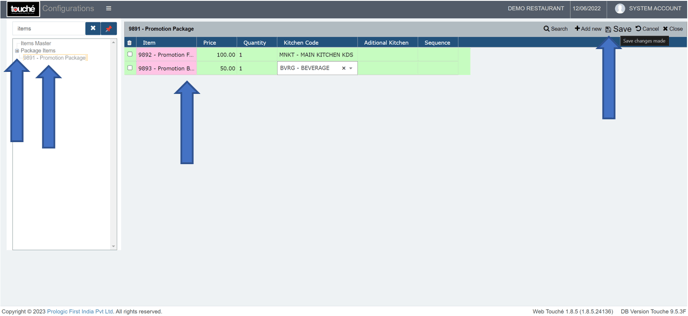
3. Click on ‘Save’ and verify on screen
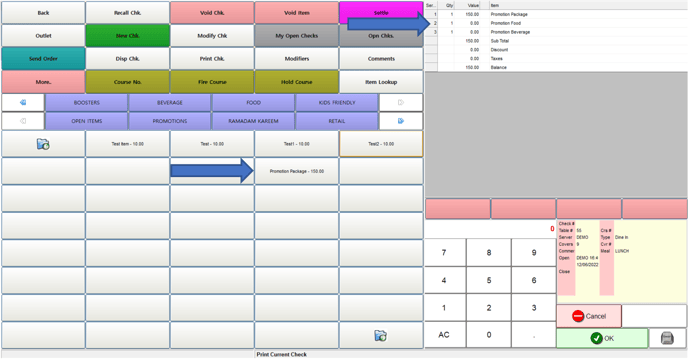
If you are using hybrid/CAP setup, please wait till next day morning for the menu to reflect in POS. To make it immediate, run the MasterSync in server or contact POS support line