![logo.png]](https://kb.prologicfirst.online/hs-fs/hubfs/Imported%20sitepage%20images/logo.png?height=40&name=logo.png)
Touche POS has the option to round-off a check's Debit Total based on required configuration. This adjustment helps to ensure settlements are done based on the currency unit value as well as eases reporting processes and calculations. Any adjustment done will be recorded against each check as well as shown in the reports.
Prerequisites:
-
WebTouche Link
-
Administrative Configurations Login
- Configurations Access to Control Centre
-
Round Off setup requirmentss
- The changes can only be done immediately after Night Audit, not before
- As below instructions are technical, if unsure kindly contact support to ensure your requirements are met correctly.
To have the same done, there are 2 major controls to be looked into and changed accordingly.
- Go to Configurations->Control Centre, look for the Keys as below
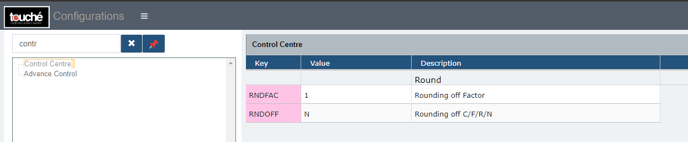
RNDFAC: This parameter defines the unit value for rounding adjustments.
For example, if the RNDFAC value is set to 0.25, rounding will occur only to amounts that differ by increments of 0.25 (such as 1.25, 1.50, 1.75, 2.00, 2.25, and so on).
RNDOFF: This field is where the round off type can be configured, below values are applicable
C - Ceiling: When this control is set to C, the check amount will be rounded up to the nearest increment defined by the RNDFAC parameter.
Consider a check of amount 399.11. With RNDFAC configured as 0.25 and the RNDOFF set as C, 399.11 will be rounded off to 399.25 due to it being the next higher round off value.
F - Floor: When the control is configured as F, the check amount will round off to the bottom of the RNDFAC set.
Consider a check of amount 399.11. With RNDFAC configured as 0.25 and the RNDOFF set as F, 399.11 will be rounded off to 399.00 due to it being the previous lower round off value.
R - Round: When the control is configured as R, the check amount will round off based on how close it is to the top or bottom.
Consider a check of amount 399.11. With RNDFAC configured as 0.25 and the RNDOFF set as R, 399.11 will be rounded off to 399.00 due to it being closer than 399.25
Consider a check of amount 399.21. With RNDFAC configured as 0.25 and the RNDOFF set as R, 399.11 will be rounded off to 399.25 due to it being closer than 399.00
N - Normal: When the control is configured as N, no round off will be done.
- As you make the changes, do not forget to click Save
If you are using hybrid/CAP setup, please run the MasterSync in server or contact POS support line for the same.