![logo.png]](https://kb.prologicfirst.online/hs-fs/hubfs/Imported%20sitepage%20images/logo.png?height=40&name=logo.png)
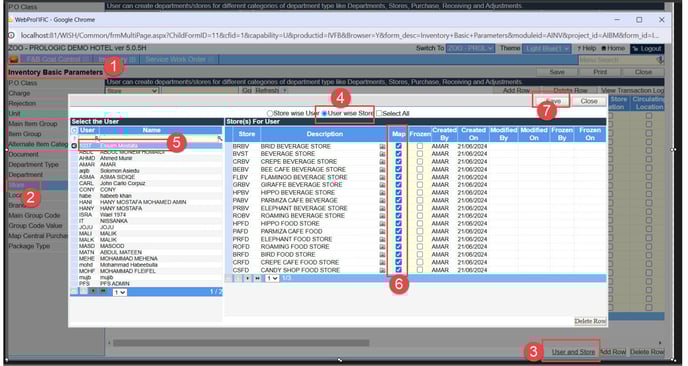
Store Access:
Switch to Property id --> Goto Inventory --> Inventory Basic Parameters --> Store --> select ‘User and Store’ --> user wise store --> select ‘User’ from list on left panel --> select store ‘Map’ (multiple store selection also possible) which user need access --> Save.
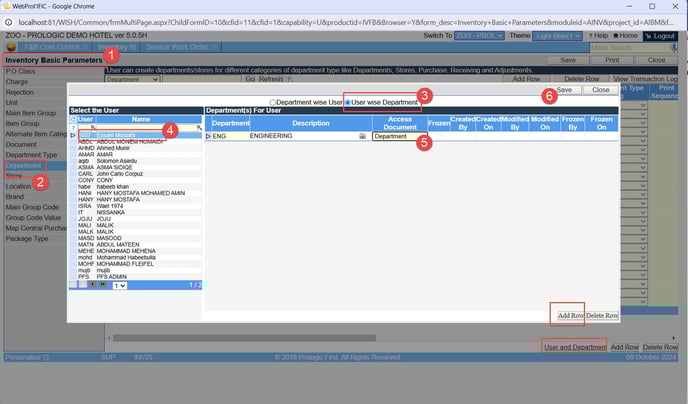
Department Access:
Switch to Property id --> Goto Inventory --> Inventory Basic Parameters --> Department --> select ‘User and Department à user wise Department --> select ‘User’ from list on left panel --> select ‘Department’ which user need access --> ‘access document’ should be Department-->Save.
Note:
- If user need to access to more than one department, by selecting ‘Add Row’, multiple department access can be provided.
- All – documents/transactions created by any user for any department
- Self – documents/transactions created by the user id
- Department – documents/transactions created only for the specific department
- Department type – documents/transactions created for all departments of the specific department type.