![logo.png]](https://kb.prologicfirst.online/hs-fs/hubfs/Imported%20sitepage%20images/logo.png?height=40&name=logo.png)
Step 1 - Login to Web Touche and search for Discount master.
Step 2 - Add new discount
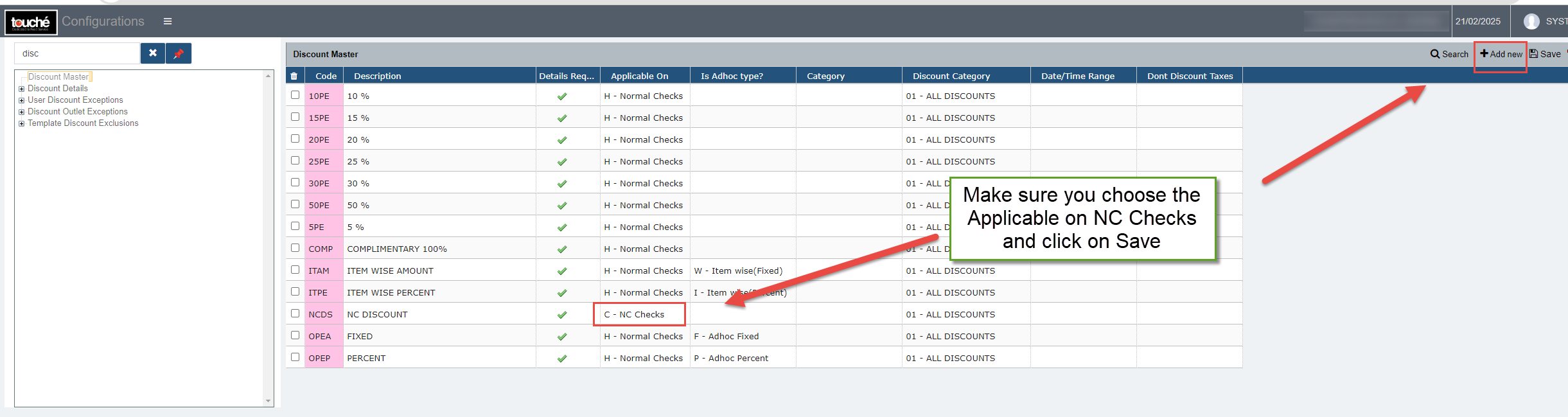
Note: Please choose Applicable on NC discount as shown in the image
Step 3 - Configure the newly created NC Discount by selecting the discount in discount details

Step 1 - Login to Web Touche and search for Discount master.
Step 2 - Add new discount
Note: Please choose Applicable on NC discount as shown in the image
Step 3 - Configure the newly created NC Discount by selecting the discount in discount details